


Linux in the Hamshack
Sholto Fisher, K7TMGArticle from the West Mountain Radio Quarter 4, 2019 Newsletter
We recently had a customer who mentioned we might consider writing about Linux operating systems because "it is used more than you think". I have actually been promoting the use of Linux in a ham radio environment for more years than I care to remember, and certainly the number of users is growing all the time.
There are many good reasons to use a Linux operating system, and ham radio applications are well-supported by a variety of programs.
Long gone are the days when you had to be a computer whiz kid to get Linux onto your PC. Nowadays you can burn a USB flash drive with an image, boot to it and install Linux in a matter of minutes. You don't even have to install it, as some Linux distributions are happy to run from the flash drive directly.
This is a great way to take a Linux test drive or even take your operating system with you wherever you go.
You might also consider one of the small, inexpensive, single board computers which are available these days such as the Raspberry Pi. This is a complete PC with a Linux operating system on it and is perfectly suited for ham radio use.
Let's look at a few other benefits of using Linux vs Windows.
Linux is free, you don't need to pay anyone to install or use it. Linux is not some time-limited program with pop up adverts. It is a real, modern, operating system that is usually 100% compatible with your entire computer hardware.
Because it is not Windows or OS-X, it is in many ways more secure and less likely to be targeted by viruses or malware. It is generally much safer to browse the web or read emails on a Linux computer.
It is available in a number of different distributions (aka 'distro'). This might be difficult for long time Windows users to think about but it basically boils down to choosing a particular distro (flavor) which suits you. If you don't like the look of one distribution, just try another!
Linux is a great choice for an old desktop or laptop PC that was left behind by Windows. You can find a distribution which will work on even ancient PC hardware! So go ahead and put that old machine back in use instead of consigning it to the landfill.You will find that other Linux users are often very helpful and it may be worth asking around your club members to see if someone will take you under their wing and help you get started.
There are literally hundreds of distributions to choose from but the main well known ones are probably the place to start. I personally use Debian, but Linux Mint, Ubuntu and Manjaro are all worthy contenders.

A good place to start is https://distrowatch.com/which details all of the major distributions. Their "page hit ranking" column on the right hand side is a good way to gauge the popularity of currently used distributions. Anything in the top 5 is probably a safe bet.
Once you have selected the distribution you want to try, you should burn the downloaded image to a flash drive using a program such as UNetbootin (see https://unetbootin.github.io/ ) then restart your PC and change the boot up sequence to use the flash drive instead of the internal hard drive.
Booting from a flash drive is usually quite quick and most of the major distributions will start without issue and present you with a desktop in a matter of seconds.
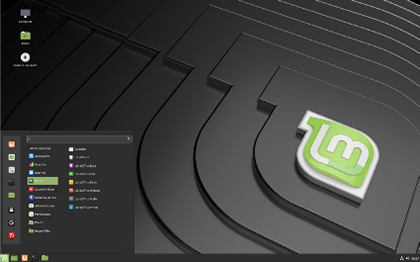
Linux Mint provides a modern, clean-looking desktop for everyday use. Mint is a good choice for someone transitioning from Windows to Linux as a lot has been done behind the scenes to make things "work out of the box".
Many of the well known major ham radio programs are written for Linux too. Software such as WSJT-X (JT and FT modes) and Fldigi (multimode and CW) are available. Other great programs to try are QSSTV (Analog & Digital SSTV), FreeDV (Digital HF voice), & Xastir for APRS use.
There are even special distros available with ham radio software baked in. KB1OIQ has a nice Ubuntu based distribution with many of the programs you will likely use already installed.

Check out Andy's Ham Radio Linux page located at https://sourceforge.net/projects/kb1oiq-andysham/ for details.
At West Mountain Radio, we have worked hard to ensure that all of our RIGblaster interfaces are supported in all operating systems. Drivers for our interfaces are in the Linux kernel which makes them truly plug and play.
73,
Sholto, K7TMG
Categories that this topic belongs to: RIGblasters


